 Buckets
Settings
Buckets works as soon as you open it. Settings change how it looks and what it does automatically.
Appearance
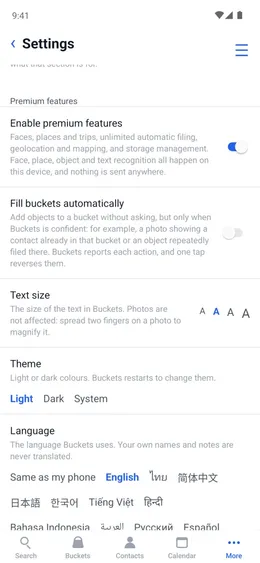
Theme: Light, Dark or the same as the phone. Text size: how big the words are. Language: any of 16; your own names and notes are never translated.
Menu ☰ → Settings

Automatic features
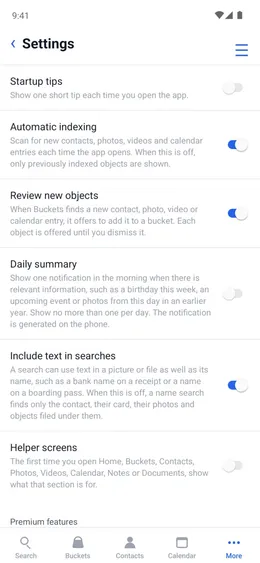
Automatic indexing reads new contacts, photos, videos and calendar entries each time Buckets opens. Fill buckets automatically files things only when Buckets is sure, says what it did, and one tap undoes it. Confirm uncertain matches keeps the photos it isn't sure about as questions.
Menu ☰ → Settings
Reading
Detect places and trips. Read text in new pictures and files. Include text in searches: when off, a name search finds only the contact, their photos and what is filed under them.
Menu ☰ → Settings
Help and notices
Startup tips shows one short tip when Buckets opens. Helper screens explain each section the first time. Daily summary is one morning notice, such as a birthday this week or photos from this day in an earlier year.
Menu ☰ → Settings
Permissions
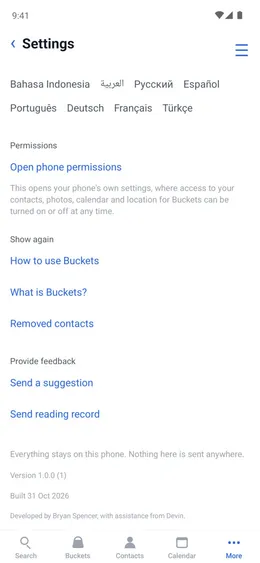
Access to phone permissions for contacts, photos, calendar, and location can be turned on or off in app settings in your phone.
Menu ☰ → Settings → Open phone permissions
Removed contacts
Contacts deleted from Buckets stay in your phone's contacts.
Menu ☰ → Settings → Removed contacts
- Tap a contact to put it back in Buckets.